Guardian Outpost 2 Tactical Defense
Reviews
Guardian Outpost 2 offers a satisfying strategic experience for players who enjoy planning and adaptation. The multiple difficulty levels and variety of opponent types keep each session engaging. The resource management aspect adds depth without becoming overwhelming. The game is easy to pick up but offers enough complexity to keep experienced players interested. Its browser-based nature makes it highly accessible. A solid choice for fans of the genre.
Description
Game Introduction
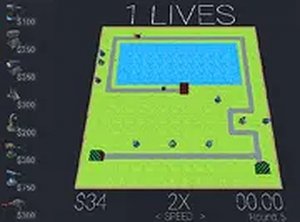
Guardian Outpost 2 is a strategy game centered on defensive planning. Players take on the role of a commander tasked with protecting a designated route. The core objective is to prevent successive groups of opponents from reaching their goal by placing defensive equipment at key points. This game appeals to those who enjoy careful thinking and tactical placement. What sets it apart is the focus on resource management and timing. Each decision about where and when to build defenses carries weight. The game includes several difficulty settings and a variety of opponent types, which introduces new challenges in each session. It is free to play and runs directly in a web browser, allowing for quick starts at any time. The experience revolves around planning and adaptation, offering a satisfying challenge for players who appreciate thoughtful gameplay. The game is designed for desktop use, with controls that allow for precise placement and quick adjustments. Players can expect to spend time learning the strengths and weaknesses of different defensive tools. The game encourages experimentation and rewards those who can anticipate opponent movements. Overall, Guardian Outpost 2 provides a deep yet accessible strategy experience for fans of the genre.
How to Play
To play Guardian Outpost 2, players typically use a mouse to select and place defensive structures on the game map. The goal is to position them along the opponent's route to maximize coverage and effectiveness. As opponents are stopped, players earn points or currency that can be used to upgrade existing structures or build new ones. The game usually consists of multiple rounds, with each round potentially introducing stronger or different types of opponents. The objective is to complete all rounds to finish the level. The game is designed for desktop play, with mouse and keyboard controls allowing for precise placement and quick upgrades. Players may also adjust difficulty settings before starting a game to match their preferred challenge level. The interface is straightforward, making it easy for new players to understand the basics quickly.
Game Features
Guardian Outpost 2 includes several features common to the strategy defense genre. It offers multiple difficulty levels, allowing players to choose a challenge that fits their experience. There is a variety of opponent types, each with different strengths and weaknesses, which keeps the gameplay fresh. The game provides several defensive structure options, each with unique abilities, and an upgrade system that lets players improve their defenses over time. Strategic placement of structures is essential for success, as players must cover the path effectively. The game is free, browser-based, and does not require any downloads, making it accessible on many devices. These features combine to create a deep yet easy-to-learn strategy experience.
Tips for Success
To succeed in Guardian Outpost 2, start by placing structures at points where the path turns, as opponents are forced to slow down there. Balance your defenses by using different structure types to handle various opponent strengths. Upgrade your most effective structures early, but also spread resources across multiple positions. Pay attention to opponent patterns and adjust your strategy for each round. Save some currency for emergency upgrades during later rounds. Practice on easier difficulty levels first to learn opponent behaviors and optimal placements. Experiment with different layouts to find what works best for your play style.