Color Weave Studio: Pattern Designer
Reviews
Color Weave Studio excels at providing a focused, relaxing experience. The grid-based loom is intuitive, and the wide color palette encourages genuine creativity. The addition of charm customization adds a nice layer of personalization. Its lack of time pressure makes it a great choice for unwinding or for introducing children to design concepts. A solid pick for anyone seeking a quiet, creative pastime.
Description
Getting Started with the Loom Interface
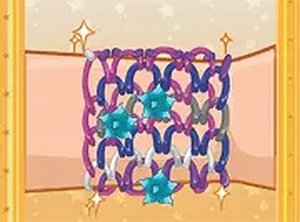
Upon opening the game, players are presented with a clean digital workspace. A rectangular grid represents the loom, with rows waiting to be filled. A color palette sits to the side, offering a broad selection of hues. The process begins by picking a shade and clicking on a row to assign it. This straightforward interaction lets anyone begin crafting immediately without a steep learning curve.
Color Selection and Pattern Planning
The heart of the experience lies in choosing which colors go where. Players can follow classic sequences like alternating stripes or gradient transitions. For those seeking originality, mixing unexpected shades such as teal with coral or lavender with gold can produce striking results. The grid layout makes it easy to visualize the final bracelet before any weaving begins, allowing for thoughtful adjustments.
Weaving and Charm Customization
Once the color rows are set, on-screen prompts guide the weaving action. This step simulates the physical act of threading, turning the digital design into a virtual bracelet. After weaving, a selection of charms becomes available. These small decorative elements can be attached at various points along the bracelet, adding a personalized flair. Charm placement requires careful consideration to maintain visual balance.
Relaxed Creative Environment
There is no timer or scoring system, which removes any sense of urgency. This design choice supports a calm, meditative approach to crafting. Players can step away and return later without losing progress. The absence of pressure makes the game suitable for winding down after a busy day or for children learning color coordination and fine motor control.
Accessibility Across Devices
The game runs entirely in a web browser, eliminating the need for downloads or installations. Controls rely on simple click-and-drag actions, which work equally well on desktop computers and mobile touchscreens. This cross-platform compatibility ensures that anyone with an internet connection can start designing bracelets instantly, whether at home or on the go.