QuackPath Platform Adventure
Reviews
QuackPath Platform Adventure stands out for its gentle difficulty curve and cheerful presentation. The pixel art is detailed and warm, making each level a pleasure to explore. Star collection adds just enough incentive without forcing perfection. The controls are responsive on both keyboard and touch, and the lack of lives or timers keeps the mood relaxed. It is an ideal choice for casual gamers or parents looking for a safe, engaging game for children. The gradual introduction of new platform types keeps the experience fresh without overwhelming players. A polished, family-friendly title that respects your time.
Description
Core Platforming Mechanics
QuackPath Platform Adventure centers on guiding ducks from one platform to the next. Each jump requires careful timing to land safely. The platforms vary in size and spacing, creating a steady increase in difficulty. Players must watch for moving surfaces and gaps that demand precise leaps. The controls are simple, using keyboard arrows or touch swipes, making it easy for anyone to start playing. Success depends on reading each section quickly and reacting without hesitation.
Visual Style and Atmosphere
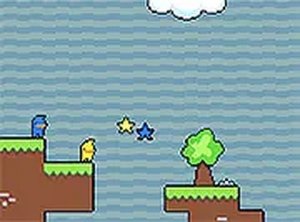
The game uses a bright pixel art style that gives each level a cheerful, retro feel. The ducks are drawn with expressive eyes and waddling animations that add personality. Backgrounds shift between sunny meadows, forest clearings, and riverside paths, keeping the scenery fresh. The color palette stays warm and inviting, avoiding any dark or intense themes. This visual approach makes the game suitable for young players while still appealing to adults who enjoy classic pixel aesthetics.
Star Collection and Scoring
Scattered along each path are sparkling stars that players can collect. Gathering these stars increases the final score for each run. Some stars are placed in easy-to-reach spots, while others require a risky jump or a detour. Deciding whether to go for a star or play it safe adds a layer of strategy. The star count does not affect progression, so players can focus on completing the course without pressure. This system rewards exploration without punishing cautious play.
Accessibility and Device Support
QuackPath Platform Adventure runs entirely in a web browser, so there is nothing to install. It works on both desktop computers and mobile phones or tablets. Touch controls are responsive, and the interface adjusts to different screen sizes. A full-screen mode is available for those who want a more immersive view. The game loads quickly and maintains a steady frame rate, even on older devices. This flexibility means players can enjoy a short session during a break or a longer play period at home.
Progression and Difficulty Curve
The platform layouts become more complex as players advance. Early stages introduce basic jumps and simple obstacles. Later sections add moving platforms, collapsing tiles, and rotating barriers. The difficulty increases gradually, giving players time to learn each new element. There are no lives or time limits, so players can retry any section as many times as needed. This design encourages practice and improvement without frustration. The focus remains on skill development rather than punishment.