Cube Quest Platform Runner
Reviews
Cube Quest Platform Runner delivers a polished platforming experience that prioritizes accessibility without sacrificing challenge. The gradual difficulty curve ensures players of all skill levels can enjoy the progression. The bright, minimalist visuals are easy on the eyes, and the responsive controls make every jump feel satisfying. The game's browser-based nature means no downloads or sign-ups, which is ideal for casual play. While it doesn't offer complex mechanics or hidden content, its focus on core platforming fundamentals makes it a reliable choice for anyone seeking a lighthearted gaming break.
Description
Core Gameplay Loop
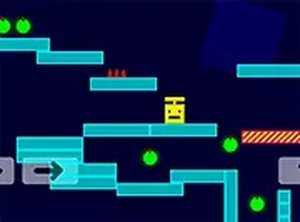
In Cube Quest Platform Runner, players take control of a small cube character that moves through a series of brightly colored stages. Each stage presents a unique layout of platforms, moving sections, and obstacles that demand precise timing to navigate. The primary goal is to collect all the glowing items scattered throughout the level. These items serve as keys to unlock the next stage, creating a clear progression path. The game focuses on precision and timing rather than complex mechanics, making it accessible to players of all ages. The controls are straightforward: use arrow keys or on-screen taps to move and jump. The responsive input ensures that every action feels immediate and accurate.
Visual Design and Atmosphere
The visual style of Cube Quest Platform Runner is deliberately cheerful and non-threatening. Bright colors and simple geometric shapes create an inviting atmosphere that appeals to a wide audience. The stages feature varied color palettes and platform arrangements, keeping the visual experience fresh as players advance. The game runs smoothly in a web browser, with a full screen option available for those who prefer an uninterrupted view. The lack of complex graphics or animations means the game loads quickly and performs well on older devices. This minimalist approach ensures that the focus remains on the gameplay rather than visual distractions.
Progression and Difficulty Curve
Cube Quest Platform Runner introduces new challenges gradually. Early stages feature simple platform arrangements with few obstacles, allowing players to get comfortable with the controls. As players collect more items and unlock subsequent stages, the layouts become more intricate. Moving platforms appear more frequently, and the placement of obstacles requires more careful timing. The difficulty curve is gentle, ensuring that players can improve their skills without feeling overwhelmed. The game saves progress automatically in the browser, so returning players can pick up where they left off. This system encourages repeated play sessions without the need for manual saving.
Accessibility and Platform Support
Cube Quest Platform Runner is designed to work across multiple devices without any installation. It runs directly in a web browser on desktop computers, tablets, and smartphones. The controls adapt to the device: keyboard arrow keys on desktop, and touch gestures on mobile. This flexibility means players can enjoy the game at home or on the go. The simple interface has no complex menus or buttons, reducing the learning curve to near zero. The game is completely free to play with no in-app purchases or advertisements that interrupt gameplay. This makes it a reliable choice for family-friendly websites and casual gaming sessions.