Spelling Gaps Word Puzzle
Reviews
Spelling Gaps Word Puzzle is a well-designed educational game that makes learning vocabulary enjoyable. The four difficulty levels cater to different skill levels, and the global scoreboard adds a motivating competitive element. The simple, intuitive interface ensures players can focus on the spelling challenges without distractions. It is completely free with no ads or in-app purchases, making it a safe choice for families.
Description
Game Introduction
Spelling Gaps Word Puzzle is an educational word game designed to help players of all ages improve their spelling and vocabulary. The core objective is to memorize a word and then fill in the missing letters using an on-screen keyboard. The game offers four difficulty levels, making it suitable for both beginners and advanced learners. It includes a large collection of English words, so players can expand their vocabulary with every session. The game is completely free with no in-app purchases, providing a safe and accessible experience for everyone. This game focuses on building language skills through a simple, engaging format that encourages practice and repetition.
How to Play
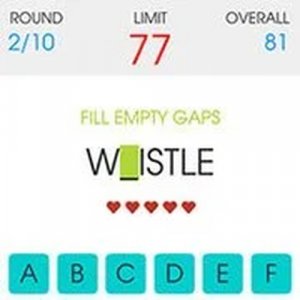
Players start by viewing a word displayed on the screen. After taking time to memorize it, they tap a button to begin the challenge. The same word appears again, but with some letters missing. Using the provided keyboard, players must fill in all the empty gaps. Each round has a time limit of 90 seconds, and there are 10 rounds in total. Players can make up to 5 mistakes before the game ends. Completing rounds quickly earns more points, and final scores can be submitted to compare with players around the world.
Game Features
This game offers entertaining educational gameplay suitable for all ages. It features original spelling challenges with simple controls, helping players learn new vocabulary across four difficulty levels. Progress tracking and global score submission are included. The game is 100% free with no in-app purchases and contains thousands of English words to practice.
Tips for Success
To improve your performance, take your time memorizing each word before starting the challenge. Focus on the spelling patterns and common letter combinations. Practice regularly to build your vocabulary and speed. Try to minimize mistakes by double-checking your answers before submitting. Playing on higher difficulty levels can accelerate learning. Finally, use the global scoreboard as motivation to improve your personal best.