
Reviews
Spelling Gaps Word Puzzle is a well-designed educational game that makes learning vocabulary enjoyable. The four difficulty levels cater to different skill levels, and the global scoreboard adds a motivating competitive element. The simple, intuitive interface ensures players can focus on the spelling challenges without distractions. It is completely free with no ads or in-app purchases, making it a safe choice for families.
About This Game
Game Introduction
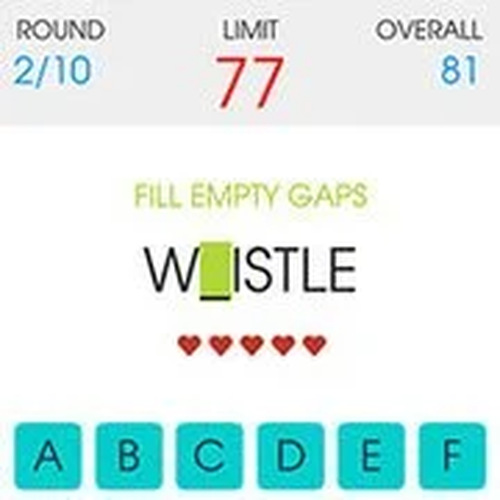
Spelling Gaps Word Puzzle is an educational word game designed to help players of all ages improve their spelling and vocabulary. The core objective is to memorize a word and then fill in the missing letters using an on-screen keyboard. The game offers four difficulty levels, making it suitable for both beginners and advanced learners. It includes a large collection of English words, so players can expand their vocabulary with every session. The game is completely free with no in-app purchases, providing a safe and accessible experience for everyone. This game focuses on building language skills through a simple, engaging format that encourages practice and repetition.
How to Play
Players start by viewing a word displayed on the screen. After taking time to memorize it, they tap a button to begin the challenge. The same word appears again, but with some letters missing. Using the provided keyboard, players must fill in all the empty gaps. Each round has a time limit of 90 seconds, and there are 10 rounds in total. Players can make up to 5 mistakes before the game ends. Completing rounds quickly earns more points, and final scores can be submitted to compare with players around the world.
Game Features
This game offers entertaining educational gameplay suitable for all ages. It features original spelling challenges with simple controls, helping players learn new vocabulary across four difficulty levels. Progress tracking and global score submission are included. The game is 100% free with no in-app purchases and contains thousands of English words to practice.
Tips for Success
To improve your performance, take your time memorizing each word before starting the challenge. Focus on the spelling patterns and common letter combinations. Practice regularly to build your vocabulary and speed. Try to minimize mistakes by double-checking your answers before submitting. Playing on higher difficulty levels can accelerate learning. Finally, use the global scoreboard as motivation to improve your personal best.
✅ Compatibility & Testing
Faq
Similar Games
Sum Links Puzzle Game
Sum Links Puzzle Game is a clean, relaxing logic puzzle that sharpens mental math skills with satisfying drag-and-link gameplay.

Puzzle Cube: Brain Teaser
A relaxing logic puzzle with clever cube rotations and hidden buttons. Perfect for family fun.
Tune Tower Puzzle Game
A calm musical puzzle game that sharpens strategic thinking. Great for family play.
Word Build Puzzle Game
Word Build Puzzle Game offers 160 engaging puzzles that boost vocabulary and quick thinking. Perfect for word lovers.

Joyful Platformer Learning Game
A bright, safe platformer that teaches problem-solving through cheerful jumping puzzles. Perfect for kids and families.
Chess Court Puzzle Challenge
A clever blend of chess and puzzles that challenges the mind without violence. Perfect for family game time.

Bernie Pirate Puzzle Adventure
A delightful water pipe puzzle game with colorful graphics and cooperative gameplay. Perfect for family fun.

50 States Learning Puzzle
A stress-free way to learn US geography. Perfect for students and trivia lovers.
Pango Path Puzzle Game
A charming and educational puzzle game that challenges logic with adorable forest visuals. Perfect for family fun.
Kaitlyn Ocean Puzzle Adventure
A delightful underwater puzzle game with charming graphics and calming music. Perfect for all ages seeking a gentle adventure.